
Say Goodbye to Data Silos, and Hello to Seamless, Scalable Analytics
“The best data architecture is invisible — it just works.”
— Every Data Engineer Ever
In the modern data landscape, agility, governance, and cost-efficiency aren’t optional, they are mandatory. Microsoft Fabric, with its powerful OneLake foundation, introduces a groundbreaking concept that embodies all three: Shortcuts.

In this post, we will explore what OneLake Shortcuts are, why they are revolutionary, and how you can harness them to build a truly unified data ecosystem without data movement.
What Are OneLake Shortcuts?
- Think of Shortcuts as “Soft Links” to Data
OneLake Shortcuts are virtual pointers to data stored elsewhere — either in another OneLake workspace or in external cloud storage like Azure Data Lake Gen2 or Amazon S3.
- But here’s the magic:
You can access, query, and analyse this data inside your Lakehouse without copying it.
- No duplication. No delays. Just clean, connected data.
Why Do Shortcuts Matter?
| Feature | Benefit |
| No Data Duplication | Save storage space and avoid unnecessary data copies |
| Real-Time Insights | Always work on the latest version of your data |
| Frictionless Collaboration | Analysts, engineers, and data scientists can access shared datasets instantly |
| Data Mesh Ready | Empower domain teams to publish and consume data independently |
Shortcuts are the backbone of a federated yet unified data strategy.
How to Create a Shortcut in Fabric
Creating a shortcut is as easy as it is powerful. Here’s how:
Step-by-Step:
- Open your Lakehouse in Microsoft Fabric
- Click New > Shortcut
- Choose your data source:
- Another OneLake workspace
- Azure Data Lake Gen2
- Amazon S3
- Browse or paste the data path or URL
- Name your shortcut, apply any filters, and save
Boom! Your shortcut now appears just like any other table or folder inside your Lakehouse.
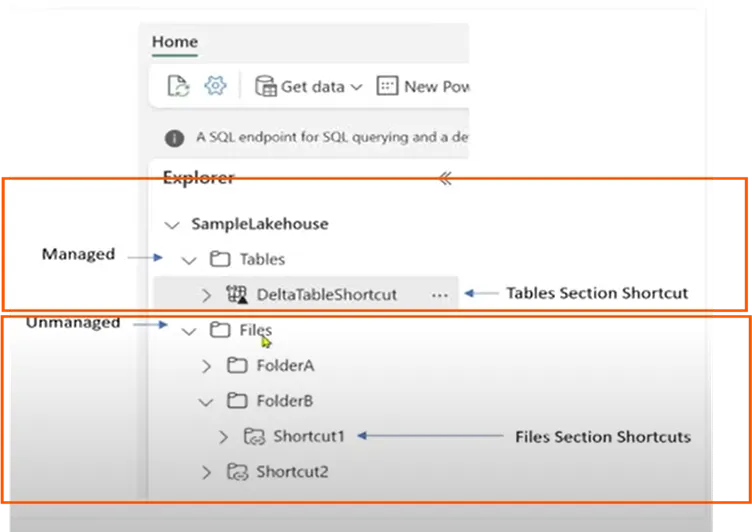
How You Can Use Shortcuts?
Once added, shortcuts are fully integrated with your Fabric ecosystem:
- Read directly in notebooks (PySpark, T-SQL)
- Join with other datasets in reports or transformations
- Ingest into Power BI datasets or semantic models
- Trigger pipelines and ML models on remote data
And you never moved a byte.
Real-World Use Cases
1. Data Mesh Done Right
Domain teams (HR, Sales, Ops) can own their data, while other teams create read-only shortcuts to collaborate — securely and in real time.
2. Centralized Data Lake, Decentralized Access
Build a single source of truth in a central Lakehouse, and expose only needed datasets via shortcuts across departments.
3. Experimentation in Sandbox Environments
Give data scientists access to large raw telemetry logs in Amazon S3 via shortcut, so they can run experiments without risking production copies.
4. Always Fresh Reporting
Power BI reports based on shortcut data are always up to date — no nightly sync jobs or stale extracts.
Best Practices for Using OneLake Shortcuts
- Name smartly: Use descriptive names like Sales_2024_Shortcut
- Secure access: Set proper permissions on the source and shortcut
- Read-optimized: Ideal for read-heavy, write-rarely workloads
- Monitor performance: Use Fabric’s diagnostic tools for query tuning
- Tag with metadata: Document purpose and lineage
Shortcuts are not just technical tools — they are strategic connectors across your enterprise.
The Strategic Edge: Shortcuts + Fabric = Velocity
Microsoft Fabric’s vision is to unify analytics across the enterprise. OneLake Shortcuts aren’t just a feature — they’re a paradigm shift.
With no data duplication, no redundant ETL, and real-time access across domains and clouds, you can build modular, governed, and lightning-fast data solutions — the way modern data should be.
Ready to Try?
In our next post, we’ll walk through a hands-on tutorial:
“Creating a Shortcut to an S3 Bucket and Running Analytics with PySpark in Fabric”
Stay tuned.
Until then — go shortcut your way to simpler, smarter data!