
Ever felt like coding in AL was like trying to solve a Rubik’s Cube blindfolded? Well, Microsoft heard the cries of developers and decided to throw us a lifeline—introducing some slick enhancements in the 2024 Wave 2 update! This blog dives deep into four game-changing features that will make you wonder how you ever coded without them.
📚 Prerequisites
Before diving into the features, ensure you have the following:
- Business Central 2024 Wave 2 or later.
- AL Language extension for Visual Studio Code.
- Basic understanding of AL syntax and Business Central development environment.
🚀 Introduction
The Dynamics 365 Business Central 2024 Wave 2 update introduces powerful AL language enhancements that streamline development, improve code readability, and boost performance. Whether you’re a seasoned developer or just getting started, these features—Full-Text Search, Type Testing and Casting, Self-Referencing Codeunits, and the Ternary Operator—will make your life easier and your code cleaner.
🔍 1. Full-Text Search for Table Fields
With the new full-text search metadata on table fields, AL developers can significantly enhance data search features, making them easier and faster for users. This feature improves user satisfaction and productivity by providing more precise and relevant search results.
Details of this feature
AL developers can now specify which table fields are included in full-text search indexes on the database. This improves the performance of the following search features:
- Companywide Search: Faster and more accurate data search.
- List Page Search: Efficient filtering within list pages.
- Lookup Search: Quicker lookups for records.
To enable full-text search, set the OptimizeForTextSearch property on fields in tables or table extensions.
Example: Enabling Full-Text Search for a Field

🔍 New && Filter Syntax
In AL code, you can now use the && filter syntax with the SetFilter() method for advanced filtering.
Example: Applying the && Filter
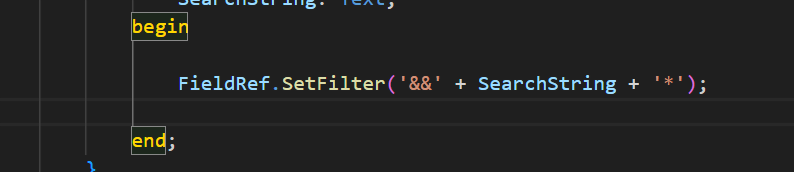
This syntax supports a subset of SQL Server’s CONTAINS operator, enhancing the flexibility and accuracy of search queries.
New Properties
Two new properties further optimize search functionality:
- Field Virtual Table: OptimizedForTextSearch property to check if a field is indexed for full-text search.
- FieldRef Data Type: IsOptimizedForTextSearch property to verify optimization for specific fields.
Why It Matters
- Faster Lookups: Indexed fields significantly reduce search time.
- Flexible Filters: Search results are more dynamic and intuitive.
- Improved UX: Users can find what they need without exact word matches.
📝 2. Type Testing and Casting Operators
In previous versions, the limited flexibility of interfaces in AL made it challenging to extend functionality and implement future updates. To overcome this, the latest version introduces support for type testing and casting interfaces in AL.
Two new operators, is and as, make it easier to work with interfaces:
- is Operator: Checks if an interface is of a specific type, ensuring type safety during coding.
- as Operator: Attempts to cast an interface into another interface, allowing for flexible interaction between objects.
These enhancements improve the extensibility and practicality of interfaces in AL, aligning with modern programming practices. Developers can now build more adaptable systems, making future updates and maintenance more seamless.
Details of this feature
The new update enables type casting between AL interfaces. You can now cast one interface into another if the underlying object (currently limited to codeunits) supports the target interface.
→ is Operator – Type Checking
The is operator checks whether an instance of an interface or a variant supports a specific interface. This ensures type compatibility before performing operations.
Example:
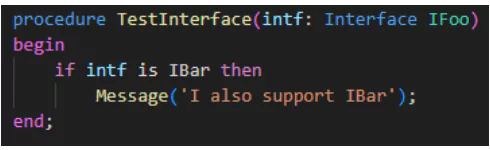
You can also use is with variants:

→ as Operator – Type Casting
The as operator allows you to cast an instance of an interface to a specific interface. If the source does not implement the target interface, an error will occur at runtime.
Example:
Similarly, you can cast variants using the as operator:

Similarly, the as keyword works with variants:

These new operators not only simplify coding but also make AL interfaces more powerful, ensuring that solutions can evolve effortlessly alongside changing business needs.
🔄 3. Self-Referencing with this Keyword
To enhance code efficiency and clarity, a new this keyword has been introduced in AL, aligning it with practices commonly found in other programming languages. This addition allows developers to pass the current object as an argument to methods without relying on complex or less efficient workarounds.
Moreover, the this keyword significantly improves code readability, especially in larger methods where it can be challenging to distinguish between global and local variables. By clearly indicating when a referenced symbol belongs to the current object, developers can write more maintainable and understandable code.
Details of this feature
The this keyword is now supported for self-referencing across all objects in AL, streamlining code development and enhancing object-oriented programming practices.
Key Benefits:
- Efficient Object Passing:
- The this keyword allows codeunits to pass a reference to the current instance as an argument to other methods. This simplifies interaction between objects and avoids the need for complex workarounds.
- Improved Code Readability:
- By explicitly referencing members of the current object, the this keyword clarifies whether a symbol is a global or local member, reducing ambiguity in large codebases.
- Automated Code Optimization:
- A new CodeCop rule AA0248 has been introduced and enabled by default with a “hidden” severity level. This means it appears as three dots in the editor without generating diagnostic warnings in the Problem view of Visual Studio Code or in build pipelines.
- Additionally, a workspace-wide CodeFixer tool is available to automatically update existing code, ensuring consistent use of the this keyword throughout your project.

Implementation in System Application:
The System Application has been refactored to incorporate the this keyword for referencing methods and global variables within the same object. This change not only enhances code clarity but also ensures alignment with modern development standards.
By adopting the this keyword, AL developers can write cleaner, more understandable code while improving maintainability and ensuring future scalability. This enhancement brings AL closer to widely accepted programming practices, promoting consistency and efficiency across development projects.
❓4. Ternary Operator
The introduction of the ternary operator ? : in AL brings a more concise and efficient approach to handling conditional expressions. Commonly found in other programming languages, this operator simplifies conditional logic, enhances code readability, and reduces unnecessary verbosity.
It is particularly advantageous for straightforward conditions, allowing developers to express logic in a more compact, intent-driven manner. By enabling variable assignment directly within the condition itself, the ternary operator ensures cleaner code structure, minimizes lines of code, and promotes maintainability.
With this release, AL developers can now leverage the ternary operator to write more elegant and efficient code without compromising clarity.
Details of this feature
The ternary operator ? : allows you to assign one of two values to a variable based on the evaluation of a condition. This eliminates the need for traditional if-then-else statements when dealing with simple conditions.
Syntax:
Variable := Condition ? TrueValue : FalseValue;
Key Benefits:
- Simplified Conditional Logic: Reduces multi-line conditional statements into a single line, making the code cleaner and easier to follow.
- Improved Readability: Promotes intent-driven programming by clearly showing the condition and both outcomes side by side.
- Efficient Variable Assignment: Allows variables to be initialized based on conditions within the same line, enhancing code structure and maintainability.
Example Comparison:
→ Traditional If-Then-Else:

→ Using Ternary Operator:
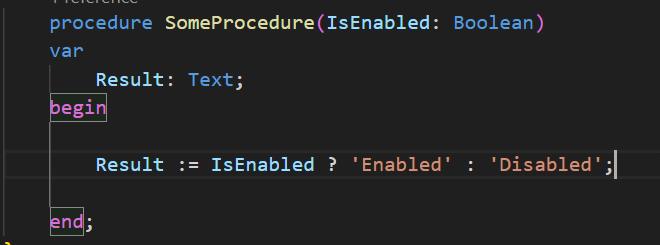
In this example, the ternary operator achieves the same outcome with fewer lines, improving both readability and efficiency.
By incorporating the ternary operator into AL, developers can adopt a more modern and streamlined coding style, leading to more maintainable and comprehensible solutions.
💡 Use Cases and Examples
- Full-Text Search: Quickly find customer records, item descriptions, or sales orders with partial word matches.
- Type Testing: Safely process incoming Variant data without risking runtime errors.
- Self-Referencing: Pass codeunit instances for event handling and reusable functions.
- Ternary Operator: Simplify condition-based calculations like pricing, discounts, or eligibility checks.
🎯 Conclusion
These four AL language enhancements empower developers to write cleaner, more efficient code in Business Central. Implementing these features not only improves performance but also enhances code maintainability and readability.
💡 “Why write ten lines when one will do? Embrace the new AL features and code like a pro!”