
Business Impact:
- We’re at a turning point for AI in the workplace. Just as the arrival of the PC transformed how we work, AI is now poised to do the same. With employees facing digital overload and rising stress, AI offers much-needed support and forward-thinking leaders are already seeing real returns.
- Copilot in Business Central is helping users boost creativity and productivity by applying AI to key tasks and offering intelligent guidance. Over time, AI will reshape how work gets done, driving meaningful business outcomes for those who adopt it early.
- Tools like the Sales Order Agent operate independently under user direction, streamlining workloads, reducing costs, and enabling employees to focus on high-value activities. This not only improves efficiency but also enhances motivation and satisfaction across teams.
- Microsoft research shows that 41% of business leaders plan to redesign processes with AI over the next five years shifting their role toward managing AI agents and ensuring responsible, ethical use.
Introducing AI Agents in Business Central:
- AI is becoming an integral part of Business Central, helping users work more efficiently and make better decisions.
- Copilot is already improving creativity and productivity by assisting in key tasks, offering suggestions, and guiding users to the right data.
- With this release, we’re expanding the role of AI by introducing AI agent tools that can automate and manage business processes independently.
- These agents are designed to perform tasks, respond to events, make decisions based on context, and resolve issues using user input when needed. They require little to no ongoing supervision and can act on behalf of a user, team, department, or the entire organization.
- As part of this evolution, we’re launching the first out-of-the-box agent: Sales Order Agent. This agent automates the full sales order process from customer emails.
What Sales Order Agent Does:
- Monitors a shared company mailbox for item requests
- Identifies the customer from records in Business Central
- Creates a sales quote based on the items requested
- Verifies product availability
- Sends the quote to the customer for approval
- Converts the quote to a sales order upon confirmation
- Sends the final order to the customer
- The agent follows clear, predefined steps and uses AI to complete tasks within Business Central. It asks for user input when needed—for example, before sending emails or requesting approval for key actions.
- Sales Order Agent is also designed with security and control in mind:
- It only has access to the parts of the system needed for its role
- It comes with predefined permissions and a dedicated role profile
- It is automatically assigned when the agent is activated
- Configuration is simple. You can:
- Choose a name for the agent
- Set up the email channel for receiving sales requests
- Select which steps of the process you want the agent to manage
- This is just the beginning of how AI agents will transform business processes in Business Central, freeing up teams to focus on higher-value work, improving response times, and delivering a more streamlined customer experience.
Steps to activate Sales Order Agent tool:
- As we see in the below image, by clicking on red marked button, green marked box opens and we can activate the Sales Order Agent tool.
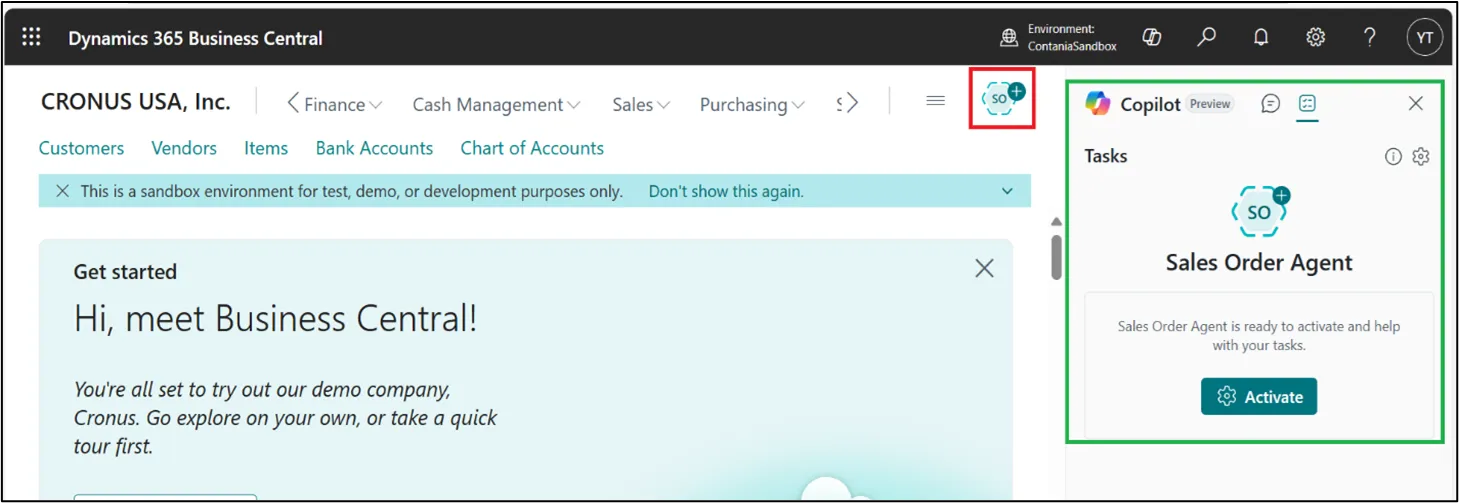
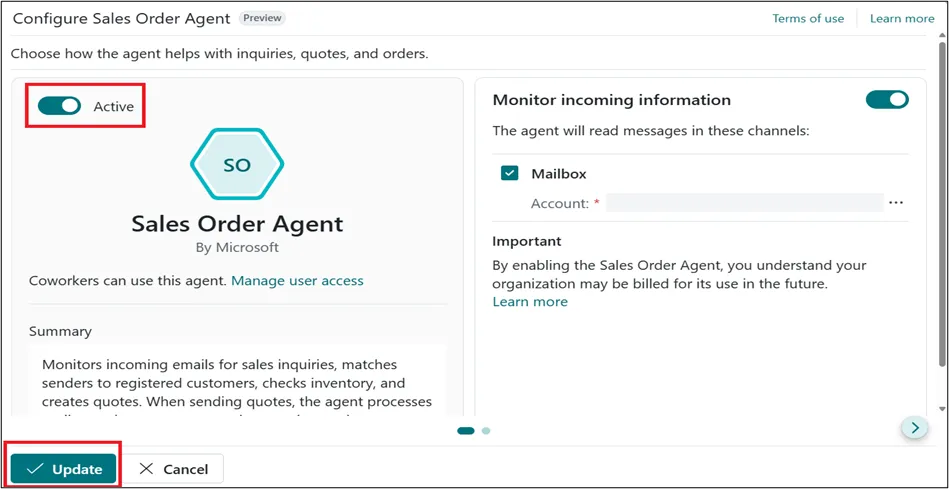
- After clicking on Activate button, it opens the page, shown in below image. Set the Activate toggle button to “TRUE” and click on Update.
How Sales order Agent works:
- Once activated, the Sales Order Agent is ready to autonomously handle the sales order process. It is triggered by an internal email processor in Business Central, which monitors the company mailbox specified during setup.
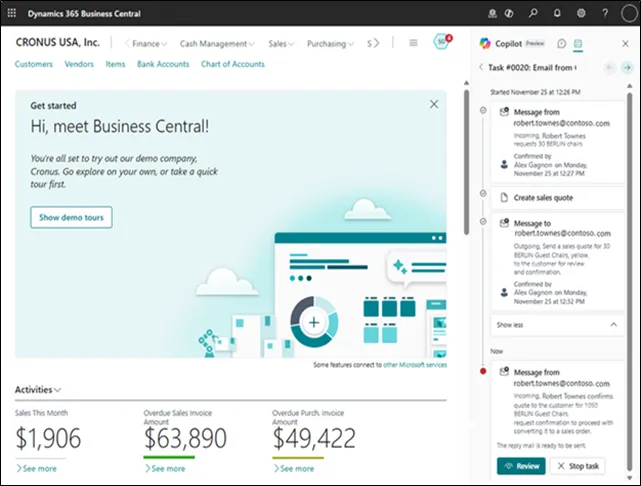
- All actions taken by the agent such as navigating Business Central pages, creating or updating records, and executing tasks, are fully transparent. You can review these actions in the Copilot pane.
- The agent operates under its own user ID, and its activity appears just like any other user’s—in list views, history, posted documents, notifications, and more—ensuring full visibility and traceability.
General flow:
- The general flow is illustrated in the figure, which is followed by more details of the steps. The actual flow might vary depending on factors such as follow-up requests, changes or cancellations in review, blocking issues, and so on.
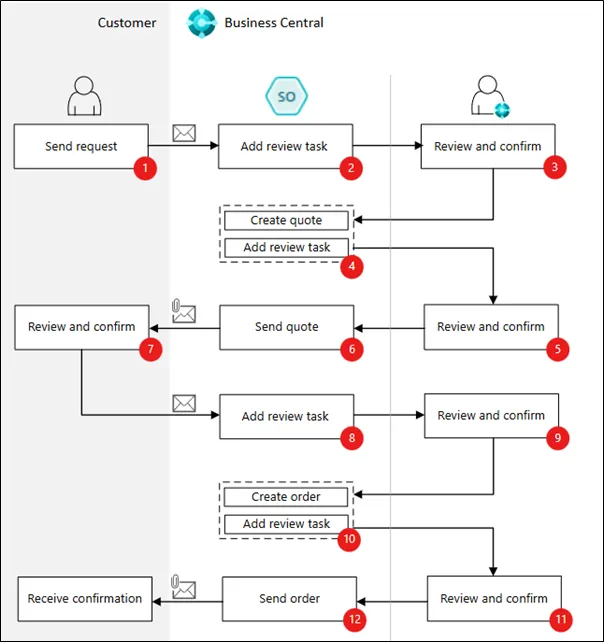
- Customer:Sends email to Business Central mailbox asking for a sales quote for items.
- Sales order agent:Picks up unread email from inbox and creates a task with a step for reviewing the incoming request.
- Reviewer:Reviews/confirms the step with email.
- Sales order agent:
- Finds the contact or customer.
- Finds the requested items and verifies their availability. Creates the sales quote.
- Adds review step with a reply email with attached sales quote as pdf.
- Reviewer:Reviews/confirms email and sales quotes.
- Sales order agent:Sends email and sales quote PDF to customer.
- Customer:Review sales quote and sends email requesting order.
- Sales order agent:Picks up email and adds review step.
- Reviewer:Reviews/confirms the confirmation email for a sale order.
- Sales order agent:
- Converts quote to order.
- Adds review task with outgoing email confirming order.
- Reviewer:Reviews/confirms outgoing email.
- Sales order agent:Sends email to customer.
Full Transparency and Control with Sales Order Agent:
- Business Central users have complete visibility and control over the actions taken by the Sales Order Agent through additional features that allow them to:
- Receive notifications from the agent, such as when it needs assistance or requires human review (e.g., for inbound/outbound messages, approvals, or missing data).
- View the task context and history with the “timeline” view, showing key steps and actions taken, accessible in the Copilot pane.
- Review detailed changes made by the agent, such as sales quotes or orders. You can inspect all modifications and suggestions before confirming or adjusting the task.
- Modify or discard steps taken by the agent, adjust the quote or order as necessary, and direct the agent to continue the process.
Conclusion:
- The Sales Order Agent marks a major step forward in AI-driven automation within Business Central. By efficiently managing the sales order process from initial request to final fulfilment, it helps businesses streamline operations, reduce manual effort, and improve overall productivity.
- With built-in transparency, security, and user control, the agent allows organizations to confidently adopt AI while maintaining full oversight. As AI continues to transform how we work, adopting intelligent tools like the Sales Order Agent positions businesses to stay competitive, make better use of resources, and focus on strategic growth.
- This is just the beginning of a new era in intelligent business process automation.