Unlocking Productivity: Summarize Records with Copilot in Business Central (Preview)
In the fast-paced world of business management, getting quick insights without digging through endless fields is a game-changer. Microsoft Dynamics 365 Business Central is taking a major leap in this direction with the “Summarize with Copilot” (preview) feature. It’s an AI-powered assistant that lives right inside your Business Central environment—and it’s here to make your day easier.
Let’s explore how this new feature works, what it can do for you, and why it’s worth your attention.
What Is “Summarize with Copilot”?
“Summarize with Copilot” is part of Microsoft’s broader vision to embed AI into everyday business tools. This preview feature introduces a Summary Fact Box on selected pages in Business Central, including:
- Customer cards
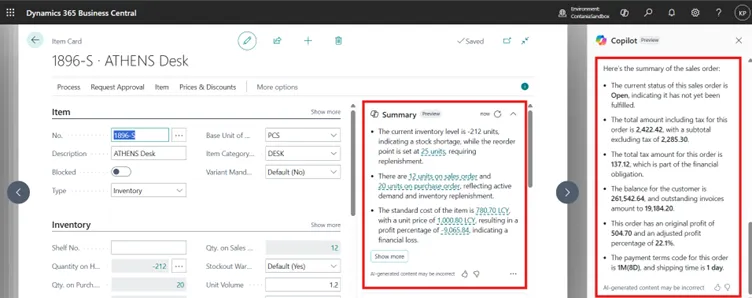
- Item cards
- Sales order pages
The Fact Box displays AI-generated bullet-point summaries that highlight key information about a record. Think of it like having a smart assistant whispering, “Here’s what you need to know.”
How Does It Work?
Using this feature is seamless and user-friendly. Here’s a breakdown:
➤ Auto-Generated Summaries
When you open a supported page, Business Central automatically generates a summary and displays it in the Summary Fact Box. It might include:
- A customer’s recent activity
- The last sales order status
- Inventory availability or movement insights
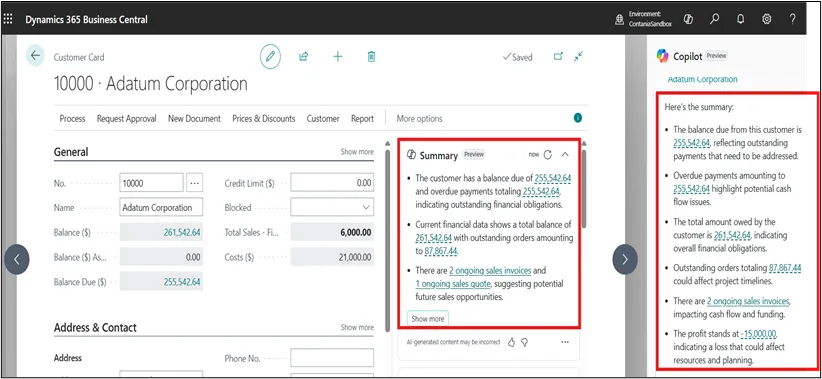
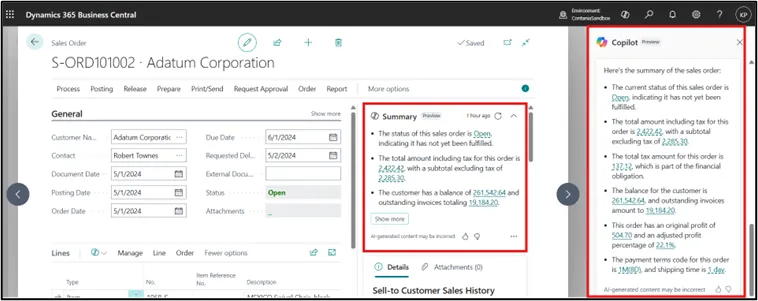
➤ Like the customer card it do not only on masters but it is on the Documents like (Sales orders, Purchase Orders)
➤ Summarize data on documents have the
- Status of document
- Due amount on customer
- Profit% on document
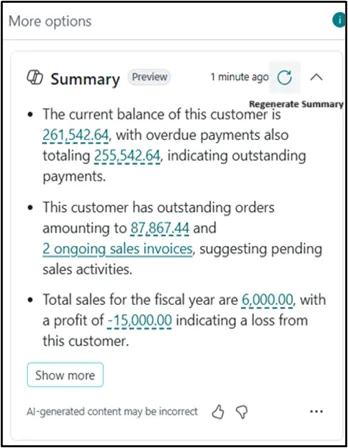
➤ Manual Refresh
Need a more up-to-date snapshot? Simply click the “Regenerate summary” button in the Fact Box. The summary will refresh to reflect the latest data in the system.
- Let’s see this in some pictures to support to understanding about this.
➤ Always Where You Left It
Your preferences matter—Business Central remembers if you show or hide the Fact Box. This means your workspace stays just the way you like it.
Why It Matters
“Summarize with Copilot” isn’t just a shiny new feature—it has real business value:
- Faster Decision-Making
You don’t need to scan every tab and field. Copilot pulls the most important insights right to the surface.
- Smart Focus
Whether you’re preparing for a customer call or reviewing sales, Copilot helps you focus on what matters.
- Better Productivity
Less time digging, more time doing. That’s a win in anyone’s book.
How to Try It
This feature is currently in preview, which means it’s available for testing and feedback but not yet part of the general release. You can enable it if you’re on the latest version of Business Central and want to explore AI-enhanced capabilities firsthand.