
Importance:
- Manual data entry slows down workflows and increases the risk of errors, impacting both occasional and expert users of Business Central. With Microsoft Copilot, organizations can significantly reduce these inefficiencies.
- Copilot automates routine tasks like filling in contact details, processing sales inquiries, and summarizing records, freeing up time for more strategic work. By integrating AI-driven assistance directly into daily operations, businesses can improve accuracy, boost productivity, and respond faster to customer needs, ultimately driving better outcomes with less effort.
Autofill Contact Details with Web Search
Building on the Autofill with Copilot feature introduced in 2025 Release Wave 1, Copilot now takes automation a step further. When entering customer or vendor contact information, Copilot automatically searches the web to suggest details such as:
- Address
- Phone number
- Website
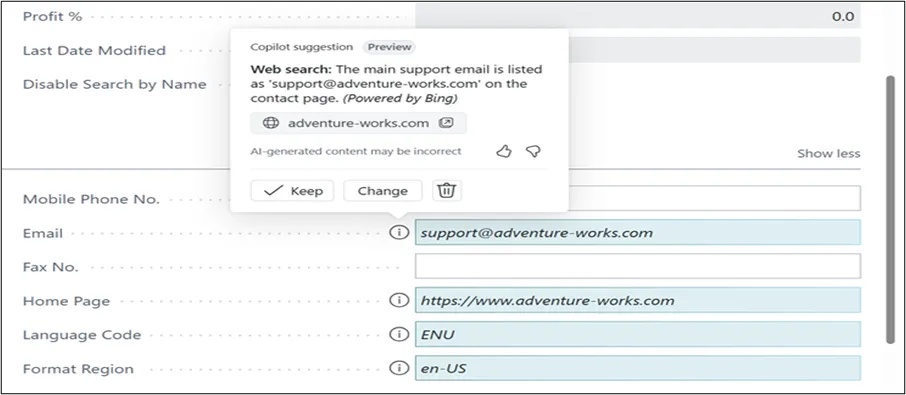
This capability reduces manual entry, ensures more accurate data, and saves time on every record. To enable this feature, administrators simply turn on Bing Search in the Copilot & Agent Capabilities settings page.
Smarter Sales Order Agent
Sales teams often juggle a high volume of inquiries, many of which come in unstructured formats. The enhanced Sales Order Agent now offers more intelligent automation to handle these scenarios with ease:
Key Enhancements:
- Attachment Processing:
Automatically extracts quote details from PDFs and images attached to emails. - Support for Multiple Ship-to Addresses:
Accurately matches the correct address if specified in the customer’s request. - Capable-to-Promise Responses:
Uses built-in planning tools to include available items that can be promised at a future date. - Automatic Email Processing:
Processes emails from known customers without waiting for user confirmation. - Resume with User Input:
Users can guide the agent using natural language when making manual changes, no need to restart the process.
These upgrades empower sales and service teams to work more efficiently, increase quote accuracy, and reduce back-and-forth communication with customers.
Analysis Assist Now Generally Available
The Analysis Assist feature in Copilot reaches general availability with some key enhancements:
- Role-based Access:
A new system permission allows precise control over who can use the feature. - Smarter Data Exploration:
Users can include fields from related tables for deeper insights. - Performance Feedback:
Immediate suggestions help avoid analysis choices that might impact system performance.
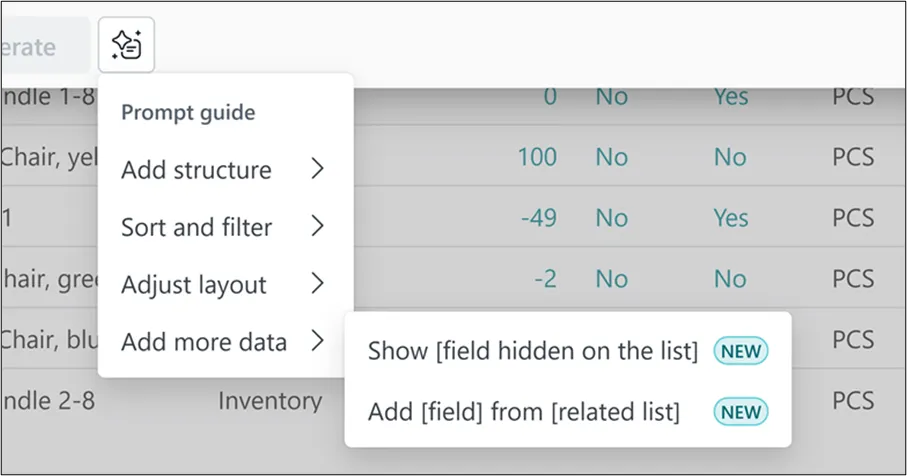
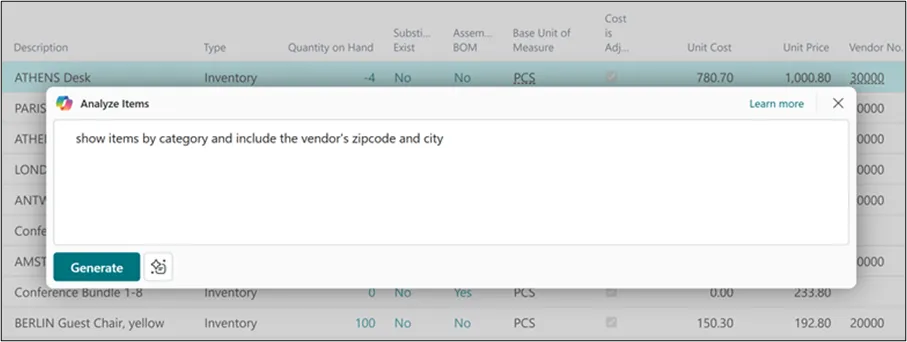
This makes data exploration more accessible for all users, not just data analysts.
Faster, Smarter Record Summaries
Copilot now delivers more comprehensive and informative summaries across key areas of Business Central. Here’s what’s new:
- Deeper Insights on Popular Pages:
Such as the Customer Card, giving users instant understanding of customer activity. - Expanded Language Support:
With 20 additional languages now supported. - Consistent Currency Formatting:
(Coming later in the release wave) Currency codes will be clearly displayed for all monetary values. - Agent Activity Highlights:
(Also coming later) Summaries will show when records were created or modified by autonomous agents.
These improvements allow users to get up to speed quickly without having to dig through record details.
Smarter Navigation with Advanced Search in Tell Me
- Finding the right page, report, or feature in Business Central can be a challenge, especially for new users or those exploring unfamiliar areas of the system. To make navigation more intuitive, this release introduces an advanced search option in Tell Me that delivers results based on semantic meaning, not just exact text matches.
- Instead of relying solely on keyword matches, the advanced search considers page properties, related terminology, and contextual relevance to return a prioritized list of accurate results.
How it Works:
- You can access advanced search from the role or report explorer or directly from Tell Me using the shortcut Alt+Q.
- In the Role or Report Explorer, enter a search term in the Find box and then click Try Advanced.
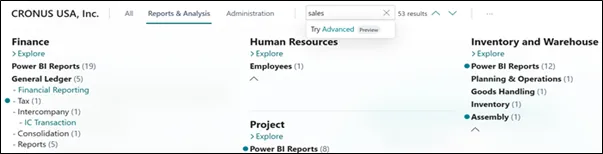
- This opens the Advanced tab in Tell Me, where your search terms are automatically carried over and results are displayed.
- From here, you can further refine your search with new terms to quickly locate what you need.
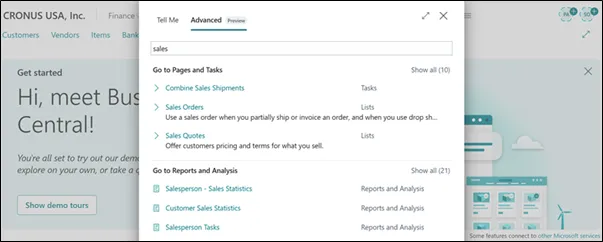
This enhancement makes it easier than ever to discover and navigate features in Business Central, especially for complex environments with a large number of pages and reports.
Why It Matters: Business Value
The latest Copilot enhancements directly address the core challenges faced by modern business users:
- Reduce Manual Work: Less time spent on repetitive data entry.
- Increase Accuracy: Automated, web-sourced data reduces the risk of typos or missing details.
- Boost Responsiveness: Sales and service teams can respond faster with more relevant, accurate quotes.
- Empower Every User: From power users to occasional users, Copilot makes Business Central easier and more intuitive to use.
By embedding intelligence into everyday processes, Copilot for Business Central helps businesses operate more efficiently, serve customers better, and make smarter decisions—faster.
Conclusion: Work Smarter, Not Harder with Copilot
- As businesses strive to do more with less, Microsoft Copilot in Dynamics 365 Business Central delivers tangible value by automating routine tasks, improving data accuracy, and accelerating decision-making. From auto filling contact details to processing complex sales inquiries, Copilot transforms how users interact with their business systems making work faster, smarter, and more intuitive.
- With each release wave, Copilot continues to evolve into a true digital assistant that empowers your team to focus on what really matters: serving customers, closing deals, and driving growth.
- Now is the time to embrace AI-driven productivity.
Let Copilot handle the busywork so you can focus on the business.